
AI Staging That Adds Furniture Without Changing the Room: What to Inspect
Virtual staging should help buyers understand an empty room—not quietly redesign it. Use this inspection workflow to catch structural drift before a listing goes live.
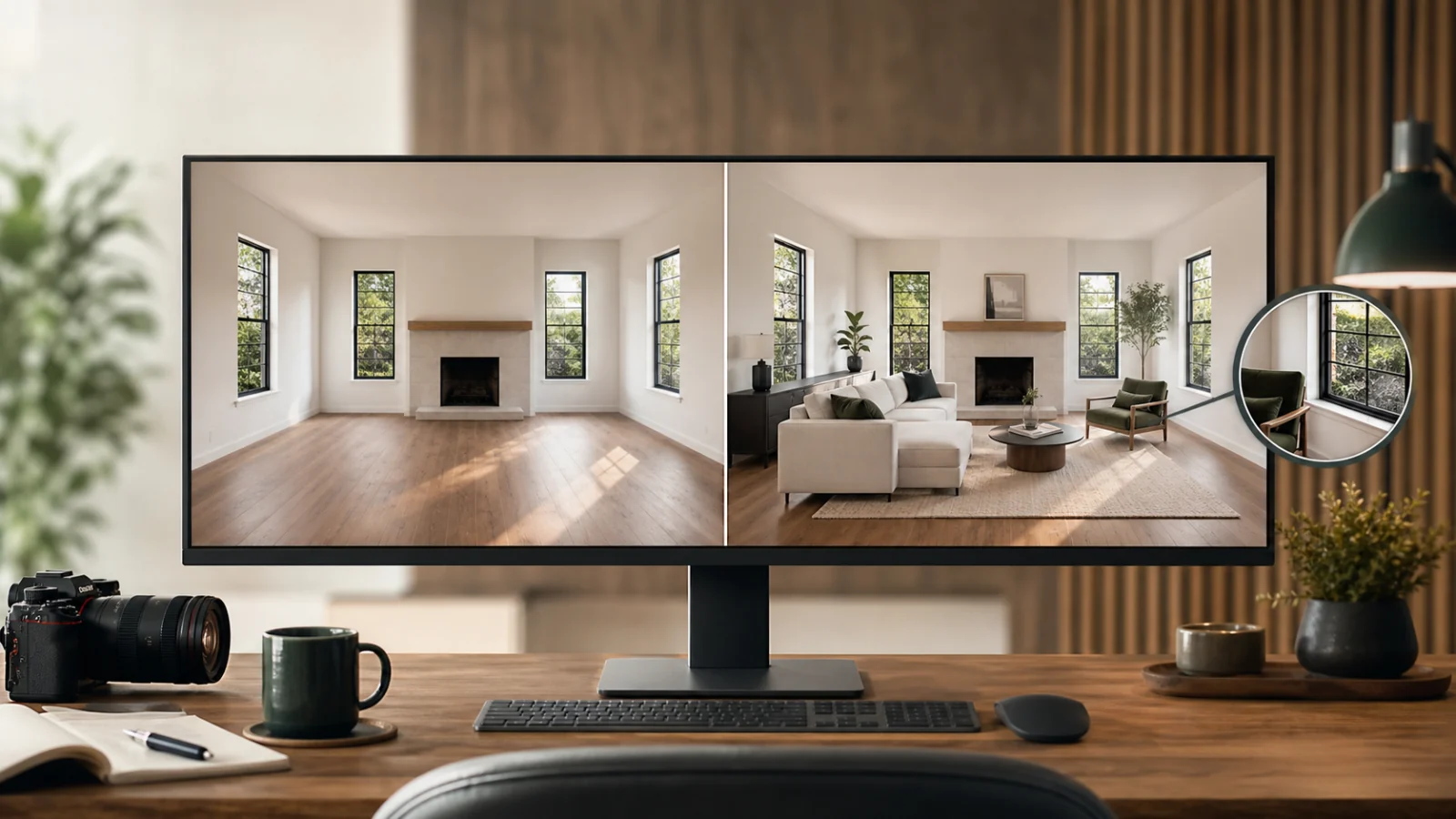
Good AI staging adds removable furniture and decor while leaving the photographed property intact. The walls, openings, ceiling lines, flooring, built-ins, fixtures, view, and camera position should remain the same. Furniture should fit the room, sit on the floor, cast believable shadows, and never block evidence a buyer needs to evaluate. Before publishing, compare the staged result beside the original at full resolution—not from memory or from a small thumbnail. If a model has widened a room, moved a window, repaired damage, invented a fireplace, or hidden a permanent feature, reject the result. A more attractive image is not useful when it no longer represents the property.
Why “just add furniture” is harder than it sounds
An empty room gives a staging model fewer visual anchors than a furnished one. Repeated white walls, reflective floors, wide-angle distortion, partially visible doors, and bright windows all invite the model to reinterpret the scene. The output can look polished while changing facts by only a few pixels: a baseboard disappears behind a sofa, a window becomes wider, or a ceiling beam shifts.
Those small errors matter. Virtual staging is most valuable when it communicates scale and possible use. If the edit changes the scale or the fixed structure, it defeats that purpose. The reviewer therefore needs two different judgments:
- Does the furniture make the room easier to understand?
- Is the staged image still a faithful presentation of the original room?
The second question must win whenever the two conflict.
What AI staging may change
For a conventional vacant-room workflow, the allowed edit is narrow:
- Add movable furniture such as a sofa, bed, dining table, chairs, lamps, rugs, and removable decor.
- Add plausible contact shadows and reflections required to seat those objects in the photographed light.
- Make minor global exposure or color corrections that would also be acceptable on the original.
- Crop both original and staged versions identically if the delivery specification requires it.
Anything fixed to the property belongs outside that permission unless the listing explicitly describes a renovation visualization rather than ordinary virtual staging. Walls, doors, windows, fireplaces, cabinets, plumbing fixtures, ceiling lights, floor materials, views, and visible condition should not be redesigned.
Use a source-to-final inspection, not a beauty review
Open the original and staged image side by side at the same zoom. First synchronize the crop and perspective so your eye does not mistake a framing difference for a property change. Then move through the image in a fixed order.
Check the room envelope
Trace every boundary before looking at the furniture:
- Wall corners and ceiling lines meet in the same place.
- Doors retain the same width, swing clues, trim, and hardware.
- Windows keep the same panes, frames, sill height, and outdoor view.
- Fireplaces, radiators, vents, outlets, switches, and built-ins remain visible and unchanged.
- Floorboards, tile joints, and permanent transitions continue behind staged objects logically.
This “envelope first” pass catches the most serious failures before the styled result distracts you.
Check furniture scale and circulation
Furniture must fit the room suggested by the original perspective. A sofa should not be wider than the wall that supports it. A dining chair needs space to pull out. A bed should not make the doorway unusable.
Look for:
- Seating that blocks a door, closet, stair, or HVAC register.
- Rugs that bend up a wall or float above the floor.
- Tables with impossible leg positions.
- Oversized pieces that make the room look artificially larger.
- Tiny furniture used to exaggerate floor area.
- Arrangements that ignore the photographed focal length and vanishing lines.
The goal is not a perfect interior-design plan. It is a plausible example of use that does not manipulate perceived dimensions.
Check light, shadow, and contact
Every added object should inherit the room’s light direction. Compare the brightest side of the furniture with highlights on window trim, floors, and existing fixtures. Then inspect where objects meet the floor.
Common failures include:
- A sofa with light from the right in a room lit from the left.
- Contact shadows that are missing, too dark, or detached.
- Chair legs that dissolve into a rug.
- Reflections added to a matte floor or omitted from a glossy floor.
- Lamps that appear switched on without affecting nearby surfaces.
Believable staging is often restrained. Dramatic artificial light can make a weak composite look cinematic in a thumbnail while exposing contradictions at full size.
Preserve visible condition
Virtual staging should not become an accidental repair tool. Keep scuffs, uneven flooring, wall marks, cracked tile, window condition, and other visible facts. A furniture placement may naturally cover part of a surface, but the edit should not deliberately conceal a material issue.
When an important feature would be hidden, revise the layout or select another angle. If the room cannot be staged without covering relevant condition, the original image becomes especially important.
For a broader compliance workflow, pair this article with the MLS photo compliance guide and the virtual staging disclosure guide. Rules differ by market, platform, and client, so the listing professional should confirm the requirements that apply to the property.
Compare the original and staged image as a pair
Keep an unedited source image associated with every staged result. The pairing provides three practical benefits:
- Reviewers can prove that fixed features were preserved.
- Agents can disclose the edit and show the vacant condition when required.
- Future revisions can return to the source instead of editing an already generated result.
Do not repeatedly regenerate from the last staged version. Each generation can compound structural drift. Start every alternative style or revision from the approved source image.
A delivery checklist
Before approving a virtually staged room, confirm:
- ☐ The original file is retained and identifiable.
- ☐ Original and staged crops match.
- ☐ Walls, doors, windows, ceiling lines, floors, built-ins, and views match.
- ☐ Visible condition has not been repaired or concealed.
- ☐ Furniture scale follows the room perspective.
- ☐ Doorways, circulation paths, and permanent fixtures remain usable and visible.
- ☐ Shadows and reflections match the photographed light.
- ☐ No object floats, melts, duplicates, or intersects another object.
- ☐ The staged image is labeled according to the applicable listing rules.
- ☐ Original and edited versions are delivered together when required.
Where automation helps—and where it stops
AI can produce useful layout candidates quickly and make it practical to test a living room, bedroom, or dining-room concept without building each composite by hand. It is especially helpful for vacant, clearly photographed spaces with visible floor boundaries.
It is less reliable when:
- Multiple rooms overlap through wide openings.
- Mirrors reflect areas outside the frame.
- Strong glare hides floor or wall edges.
- The image contains complex railings, ceiling beams, or built-ins.
- Several camera angles must show exactly the same furniture arrangement.
Treat generation as a candidate-making step. Human comparison against the source remains the approval step. Curbora can process individual source photos and create staged candidates, but it does not guarantee a persistent three-dimensional room model across independent angles.
Frequently asked questions
Can virtual staging cover a wall mark or floor stain?
Furniture may naturally overlap a small area, but using staging to conceal a material condition creates risk. Preserve visible defects, retain the original, and choose a layout that keeps important condition understandable.
Should every staged image have the same furniture?
Images of the same room should feel coherent, but independent AI generations may move or redesign objects. For exact multi-angle continuity, use a workflow built around a shared scene or perform a careful manual consistency review.
Is a staged room allowed to look brighter?
Normal exposure and white-balance correction can be appropriate if it does not change the property or view. Avoid lighting that invents sunlight, hides condition, or implies fixtures that were not present.
Do I need to publish the vacant original?
Requirements vary. Some MLSs and jurisdictions require disclosure, pairing, or access to the original. Even when public pairing is not mandatory, retain the source and confirm the rule with the listing professional.
Stage the possibility, preserve the evidence
Use Curbora to create a furniture-only staging candidate, then compare it with the original before delivery. Try AI virtual staging.