
Virtual staging disclosure: a practical guide for listing photos
A practical workflow for labeling virtually staged real estate photos, pairing every edit with its original, and preparing a transparent MLS handoff.
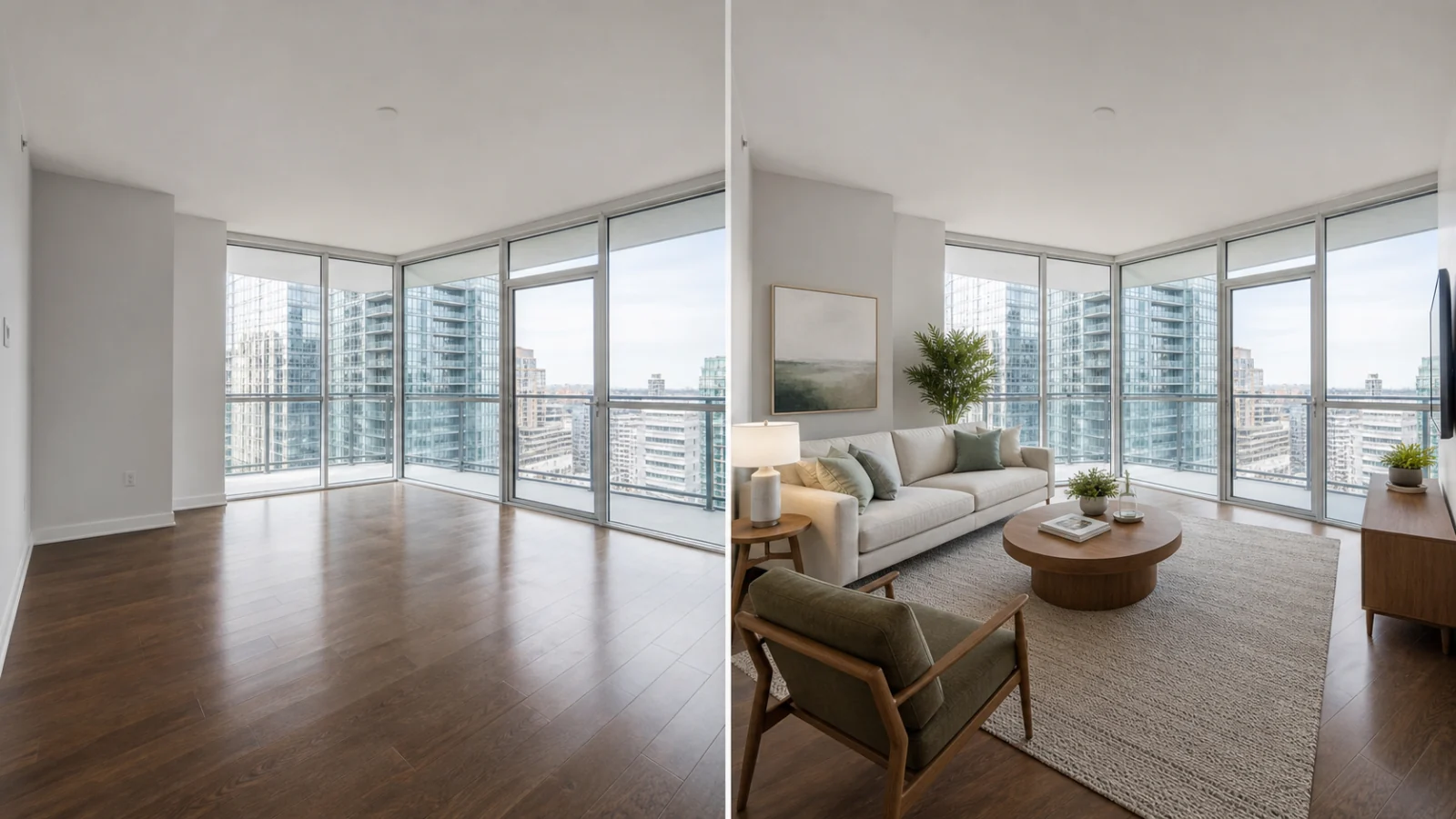
Before you use this guide: This guide is practical workflow information, not legal advice. State law, local MLS rules, brokerage policy, and the destination where an image will appear may impose different requirements. Confirm the current rules that apply to each listing before publishing.
What virtual staging disclosure is designed to prevent
Virtual staging helps buyers understand how an empty or sparsely furnished room might function. The same image can become misleading, however, when a viewer cannot tell that furniture, decor, or other visual elements were added digitally. A useful virtual staging disclosure closes that gap. It tells the viewer that the image is a visualization, preserves access to the actual condition of the room, and gives the listing team a record of what was changed.
The governing principle is broader than any one label. Article 12 of the National Association of REALTORS Code of Ethics says advertising and marketing should present a true picture, and Standard of Practice 12-10 applies that obligation to online content and images. Local MLS rules translate that principle into operational requirements, such as where the disclosure must appear, whether the original must be adjacent, and whether text may be placed directly on an image.
That is why a disclosure workflow should begin before an edited image is generated. The source photo, edit type, intended publishing destination, and approval history all affect whether the final image can be used and how it should be presented.
First, identify which rule actually governs the listing
There is no single nationwide virtual staging rule that can be applied to every MLS. A listing may be affected by several layers at once: general truth-in-advertising duties, state law, the rules of the local MLS, and a brokerage or client policy that is stricter than the MLS minimum. Syndication makes the question more complicated because a caption that appears inside an MLS interface may not travel to an IDX website or consumer portal.
California provides a useful example of why location matters. California AB 723 took effect on January 1, 2026. When a broker, salesperson, or someone acting on their behalf uses a digitally altered image in advertising or promotional material for the sale of real property, the law requires a reasonably conspicuous disclosure and access to the original, unaltered image through a public website, URL, or QR code. The law also distinguishes element-changing edits from common photographic adjustments that do not change the representation of the property.
Before creating a final package, record the property state, local MLS, brokerage policy, and every place the image is intended to appear. If the answer is uncertain, pause and ask the listing broker or MLS compliance team instead of relying on a generic template.
- Confirm the state and local MLS for the property.
- Check the current media rules on the MLS website, not an old screenshot or social post.
- Ask whether the brokerage requires a specific disclaimer, approval, or image order.
- List every destination: MLS, IDX, brokerage site, property website, social media, print, or advertising.
- Treat the strictest applicable requirement as the publishing baseline for that destination.
Know what counts as staging or digital alteration
Virtual staging usually means adding or replacing movable furniture and decor to show a possible use of a room. Adding a sofa, dining table, rug, artwork, curtains, or plants to an empty interior is different from correcting exposure or straightening vertical lines. It is also different from a renovation rendering that changes flooring, cabinets, walls, fixtures, or the exterior of the property.
The distinction matters because ordinary photographic corrections may fall outside a particular digitally altered image rule when they do not change the representation of the real property. California AB 723, for example, excludes lighting, sharpening, white balance, color correction, angle, straightening, cropping, and exposure adjustments when they do not alter that representation. CRMLS similarly describes minor brightness, color, sharpening, and lighting corrections as outside its digitally altered image rule.
Do not use those exclusions as permission to make an image look materially different from the property. An edit can start with a familiar tool and still become misleading. Recovering an existing window view is different from replacing it with a better view; correcting color cast is different from presenting a new paint color; removing a photographer bag is different from removing utility lines or a visible defect.
Keep the original and every staged image permanently paired
The original image is not just a backup. It is the evidence that allows a buyer, agent, client, or compliance reviewer to understand the actual room. Every staged result should point to one immutable source photo, and the relationship should survive renaming, downloading, client review, and later revisions.
This source-to-edit link solves several common problems. It prevents a team from pairing a staged bedroom with the wrong original, makes before-and-after review reliable, and allows a delivery package to follow local ordering rules. It also lets the team retire a weak candidate without losing the history of how the selected image was produced.
Several MLS policies make this pairing visible to the audience. CRMLS requires the original, unedited image immediately before or after the altered image. SmartMLS requires the as-is image first and the altered version second. Canopy MLS requires a nonstaged original immediately before or after an AI-enhanced or virtually staged image, or easily accessible alongside a virtual tour. A workflow that stores only the final JPEG cannot reliably meet these different requirements.
- Retain the uploaded original without overwriting it.
- Assign every generated candidate to a specific source photo.
- Keep the selected final separate from rejected or experimental candidates.
- Use stable file and database identifiers rather than matching images by visual similarity.
- Export the original and final in the order required by the selected MLS profile.
Use a disclosure that survives the publishing destination
A clear label uses ordinary language a consumer can understand, such as Virtually Staged or Digitally Altered. Avoid vague phrases such as enhanced, concept image, or artist impression when they do not explain that the room was changed digitally. The label should be readable at the size and placement in which the image will actually be viewed.
Placement is not universal. CRMLS instructs users to label the photo description and place the original next to the altered image. SmartMLS says a caption is not enough because it may not be included in third-party data feeds; its policy calls for a stamp or watermark on the image itself and a defined as-is/altered sequence. Canopy MLS also requires a readily visible disclosure directly on the image or within the virtual tour and rejects disclosure that appears only in captions or remarks. ARMLS has its own system-provided watermark and media rules. These examples point to a practical rule: choose the disclosure method from the destination profile, not from personal preference.
Test the disclosure after export. Open the actual JPEG at a realistic listing-card size, inspect the MLS preview, and verify what appears after syndication when possible. A label that exists in a project database but disappears from the consumer-facing image is not an effective disclosure.
Protect property facts, not just room dimensions
A disclosure does not make every alteration acceptable. Virtual staging should help viewers imagine furniture and decor without changing what is being sold. Walls, doors, windows, floors, cabinets, fixtures, ceiling height, room proportions, views, neighboring properties, utility infrastructure, landscaping, and material defects can affect a buyer’s understanding of the property. Editing those facts can cross from presentation into misrepresentation.
The safest staging brief is narrow: add or replace movable furnishings and decor while preserving the architecture, surfaces, openings, built-in elements, exterior context, and visible condition of the room. Avoid people, pets, lifestyle scenes, signage, and demographic cues. Some MLS organizations restrict these elements for media quality and fair housing reasons in addition to ordinary disclosure concerns.
Object removal requires the same discipline. Removing a temporary storage box, loose cable, or personal photograph may be acceptable under an approved workflow. Removing a cracked tile, water stain, power line, neighboring structure, or permanent fixture is a different category. If an edit changes a property fact or conceals a condition, do not place it in a listing-ready package merely because it carries a disclosure label.
A repeatable virtual staging disclosure workflow
A dependable process separates creation, selection, and publication. During creation, the team can compare multiple candidates and reject generations that distort geometry or invent features. During selection, one or more approved finals are deliberately marked for delivery. During publication, only the approved files are combined with the required originals, labels, and destination-specific ordering.
The following sequence works for an individual agent, a real estate photographer, or a larger media team. It creates enough evidence to answer a client question without turning every project into a compliance exercise.
- Intake: confirm image rights, property location, MLS, brokerage policy, and intended destinations.
- Source control: store the original photo as an immutable asset and assign it a stable identifier.
- Edit brief: specify movable furniture and decor only, plus explicit instructions to preserve structure, fixtures, surfaces, views, and visible condition.
- Candidate review: compare each result with the original at full size and reject geometry changes, hidden defects, invented views, or implausible scale.
- Final selection: mark only approved candidates as finals; do not mix unapproved experiments into the delivery set.
- Disclosure: apply the exact label and placement required for the destination.
- Pairing: place or link the original according to the applicable MLS or state rule.
- Export check: verify dimensions, file format, branding restrictions, image order, and disclosure legibility.
- Handoff: give the listing broker the finals, originals, edit summary, and a note identifying which rules still require broker confirmation.
Common disclosure mistakes to avoid
The most common failure is treating disclosure as a line of text added at the end. By then, the original may be missing, the staged image may have been renamed, or the edit may have changed more than furniture. Another failure is assuming that a watermark approved by one MLS will be accepted by another. Some systems require a visible mark; others restrict arbitrary text and permit only an approved watermark.
Teams also create risk when they send every generated candidate to the client without identifying which images are approved for publication. A realistic-looking candidate can be mistaken for a final and uploaded before anyone checks its source pairing or property facts. Keep review assets and publishing assets clearly separated.
- Do not publish a staged image without a reliable path back to its original.
- Do not rely on a caption unless the destination confirms captions remain visible to consumers.
- Do not assume that disclosure cures a prohibited or misleading alteration.
- Do not add brokerage branding, contact information, or arbitrary text to an MLS image without checking the media rules.
- Do not reuse a disclosure package for another MLS without rechecking placement, order, watermark, and file requirements.
- Do not describe an image or workflow as universally MLS compliant.
Final checklist before publishing a virtually staged photo
The final review should be short enough to perform on every listing. The goal is not to predict every legal question; it is to catch mismatched originals, misleading edits, missing disclosures, and destination errors before the files leave the project.
- The team has the right to use and edit the source photo.
- The staged image is linked to the correct, unaltered original.
- Only movable furniture and decor were changed; property facts remain accurate.
- The selected file is an approved final, not an unreviewed candidate.
- The disclosure wording and placement match the current local MLS or publishing rule.
- The original is adjacent or publicly accessible when required.
- The image order remains correct in the export and MLS preview.
- No prohibited branding, contact information, people, or unsupported text appears in the media.
- The listing broker has confirmed any state, MLS, or brokerage-specific requirement.
References
Official rules and guidance reviewed for this article. Verify the current policy before publishing.