
Best AI Real Estate Photo Editor: A 10-Photo Test Framework
The best editor is the one that passes your source set and acceptance rules. Use ten deliberately difficult images instead of vendor demos.
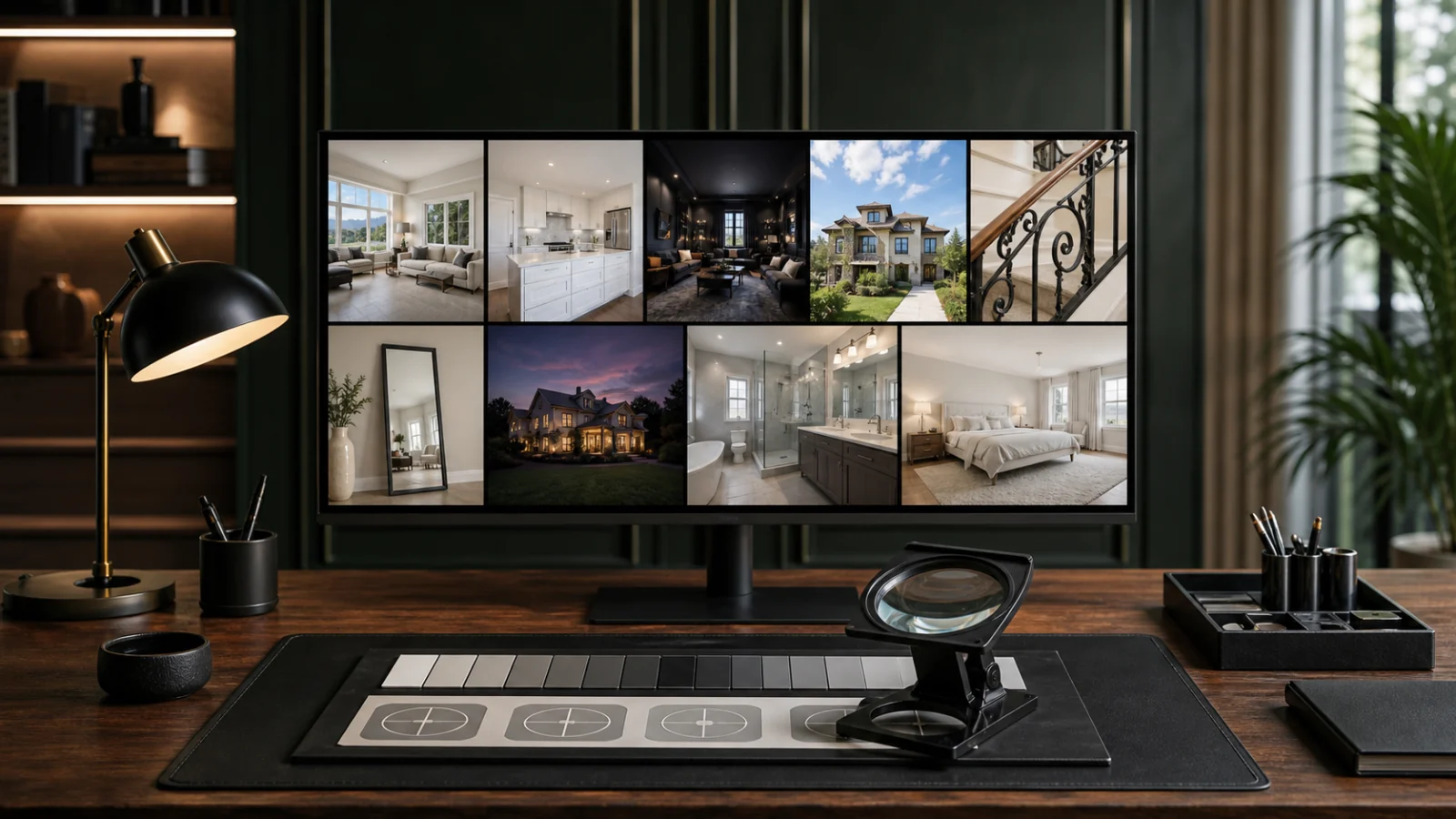
There is no universally best AI real-estate photo editor. The useful question is which tool produces the highest accepted-final rate on your cameras, properties, turnaround, and disclosure rules. Build a ten-photo test from one or two real jobs, use the same sources and instructions for every product, and score the outputs at full resolution. Include normal frames and known failure cases: bright windows, mixed lighting, white cabinets, dark wood, mirrors, fine railings, exterior sky, twilight, and a room requiring a simple cleanup. Measure source fidelity, set consistency, export quality, correction time, and total cost. Vendor demos show possibility; a controlled test shows production fit.
The ten-photo set
Use files you have permission to process and retain the originals.
Bright-window living room
Tests highlight recovery, frame edges, curtains, outdoor perspective, and whether the tool invents a view.
Mixed-light kitchen
Tests daylight, warm fixtures, reflective counters, white cabinetry, and local color casts.
White bathroom
Tests highlight texture, mirrors, glass, chrome, and whether neutral correction becomes gray.
Dark wood room
Tests shadow noise, contrast, material color, and the tendency to overbrighten.
Fine-detail interior
Choose stairs, railings, plants, blinds, or patterned furniture. Inspect sharpening, masking, and edge artifacts.
Day exterior
Tests sky, foliage, roof edges, verticals, permanent context, and natural saturation.
Twilight exterior
Tests noise, window glow, fixture color, sky transitions, and whether the tool turns blue hour into a fantasy.
Mirror or glass-heavy room
Tests reflections, duplicated objects, masking, and generative errors.
Standard bedroom
Provides an ordinary production baseline. A tool should not need a difficult image to prove consistency.
Authorized cleanup or staging candidate
Tests whether a synthetic task preserves walls, floors, doors, windows, fixed features, and visible condition.
Lock the test conditions
Use the same:
- Source files and orientation.
- Requested task.
- Export dimensions, format, and color profile.
- Revision or reprocessing opportunity.
- Evaluation screen and viewing conditions.
- Time measurement from upload to accepted final.
If one tool receives a RAW file and another receives a compressed JPEG, the test measures inputs rather than editors.
Score what matters
Use a simple zero-to-two scale: fail, needs correction, pass.
Score every image on:
- Property fidelity.
- Exposure and tonal hierarchy.
- White balance and material color.
- Window realism.
- Edge and mask quality.
- Noise and sharpening.
- Natural contrast and saturation.
- Consistency with the other nine images.
- Correct export.
Add a hard fail whenever a tool changes a fixed property fact, invents a material view, conceals condition, or produces an unusable file.
Measure accepted-final time
Record:
- Upload and setup time.
- Processing time.
- Review time.
- Correction or regeneration time.
- Manual repair time.
- Export and download time.
Fast generation with slow repair is not a fast workflow. Also record how many images can be delivered without opening another editor.
Test batch behavior
Run the ten images as a set when the tool supports it. Look for:
- Shared white-balance logic without identical settings.
- Stable brightness across rooms.
- File order and naming.
- Failed-image isolation.
- Ability to reprocess one image without changing the rest.
- Clear original-to-final pairing.
The batch editing workflow provides a production structure for this stage.
Review business fit
After image quality, evaluate:
- Current pricing and included credits.
- Resolution and watermark restrictions.
- Trial limits.
- Storage and retention.
- Training use and privacy.
- Supported source formats.
- Queue limits and peak-time behavior.
- Support and refund policy.
- Disclosure and audit records.
Verify current claims on the live vendor pages. Prices and feature limits change.
Add a repeatability run
Process two or three test images again with the same settings. If the product is generative or non-deterministic, compare how much the result changes. Variation is not always bad, but it affects approval and revision planning.
Check:
- Whether fixed property features remain stable on every run.
- Whether a correction can be reproduced.
- Whether the system exposes versions or history.
- Whether the same preset or instruction returns a compatible listing look.
- Whether failed runs consume time or credits.
A tool that requires repeated generation until one result happens to work has a lower effective pass rate than its best image suggests.
Test one real revision
Choose a near-pass image and request a narrow correction. A good workflow should preserve approved regions. Score the revised output from the beginning rather than checking only the requested spot, because global regeneration may introduce a new window, color, or geometry problem.
Classify the revision:
- Technical correction to meet the brief.
- Preference change within the original scope.
- New creative concept.
This classification reveals both product control and the true paid workflow.
Preserve a benchmark package
Store the sources, instructions, accepted outputs, scorecard, software version or test date, timing, and pricing snapshot. Remove sensitive property details when possible and follow client permissions. The package becomes a regression test when vendors update models or when your camera and delivery standards change.
Do not publish a permanent “best” ranking from one test. Report the sources, date, weights, and important failures so another photographer can understand whether the result applies to their work.
If two tools score similarly, prefer the one with clearer failures, stronger version history, and lower correction variance. Predictability usually creates more production value than one exceptional output surrounded by uncertain results.
A decision rule
Do not average away a dangerous failure. Establish minimum thresholds:
- No fixed-feature changes.
- No invented material views.
- All exports meet client requirements.
- A defined percentage of normal frames pass without manual repair.
- Difficult frames can be routed or corrected predictably.
Choose the tool with the best combination of pass rate, accepted-final time, and risk—not the most dramatic single output.
Frequently asked questions
Should I test only free trials?
Start there, but pay for a small plan if the trial limits resolution, exports, or features. Production quality cannot be judged from watermarked thumbnails.
How often should I rerun the test?
Rerun after a material model or workflow update and periodically against a stable reference set. Keep prior finals so regressions are visible.
Can I use vendor demo images?
They are useful for learning the interface, not for comparison. Use your own representative, authorized sources.
What if a tool fails only one photo?
That may be acceptable if the failure is detected and routed reliably. Hidden property changes are more serious than a visible processing error.
Is the lowest price per image the best value?
No. Include review, repair, failed exports, and workflow time in total cost.
Run the test on your own sources
Send the same ten authorized images through Curbora and score the accepted finals against your production baseline. Try the real estate photo editor.